Over the last year, AI coding assistants have become a regular part of my development workflow. Like many developers, I have spent countless hours working with tools such as Claude Code, OpenAI Codex CLI, Gemini CLI, and GitHub Copilot CLI. These tools have become incredibly capable partners for everything from debugging difficult issues to planning new features, exploring unfamiliar codebases, reviewing architecture decisions, and generating documentation.
As these tools became more deeply integrated into my day-to-day work, I started noticing a new problem.
The conversations themselves had become valuable.
Not just the final answer, but the entire discussion. The reasoning, the tradeoffs, the dead ends, the implementation plans, and the discoveries made along the way. More than once, I found myself thinking, "I know I already worked through this problem with an AI assistant." The challenge was remembering where.
Was it a Claude Code session from last week? Was it something I discussed with Codex a month ago? Did I work through it in Gemini while experimenting with a new project?
The answer was almost always somewhere in my conversation history, but finding it was often more difficult than it should have been.
That experience eventually led to the creation of Auryn.
Today, I am excited to announce the first public release of Auryn, a terminal application designed to help developers browse, search, preview, and resume AI coding sessions from a single interface.
The Growing Problem of AI Conversation History
When AI coding assistants first appeared, most conversations were relatively short. You asked a question, received an answer, and moved on.
That is no longer how many developers use these tools.
Today it is common to spend hours working through a complex problem with an AI assistant. A conversation may include architecture discussions, code reviews, implementation plans, troubleshooting steps, and follow-up refinements. In many cases, these conversations become part of the development process itself. As a result, AI conversations are beginning to resemble project history.
A discussion about a database migration may contain valuable context that needs to be revisited later. A debugging session that resolved a production issue may become relevant again months down the road. A detailed planning conversation for a feature may save significant time when new team members join a project.
The problem is that this history is often fragmented across multiple tools. Each assistant maintains its own session storage. Each presents history differently. Each has its own way of finding and reopening conversations.
As developers increasingly use multiple AI tools, the simple act of finding an old conversation can become surprisingly frustrating.
Auryn was built to address that problem.
Why Session Resumption Matters
At its core, Auryn is focused on a single use case: helping developers continue work that has already started.
Imagine opening your laptop on Monday morning and remembering that you spent several hours on Thursday investigating a difficult PostgreSQL issue with Claude Code. You remember the conversation was productive. You remember arriving at a solution. What you do not remember is the exact session name or where to find it. Or perhaps you were evaluating different implementation approaches with Codex and want to continue that work without starting over.
In both cases, the conversation already exists. The knowledge already exists. The challenge is finding the right session and returning to it quickly.
Auryn provides a unified view of your available AI sessions so that you can locate the conversation you need, preview its contents, and jump back into the original tool with the context intact.
Rather than treating AI conversations as disposable interactions, Auryn treats them as valuable work artifacts that deserve to be easy to revisit.
Current Provider Support
Auryn currently supports several of the most widely used AI coding assistants available today:
- Claude Code
- OpenAI Codex CLI
- Gemini CLI
- GitHub Copilot CLI
Each of these tools stores conversations differently and exposes session history in its own way. Auryn handles those differences behind the scenes and presents a consistent experience regardless of where the conversation originated.
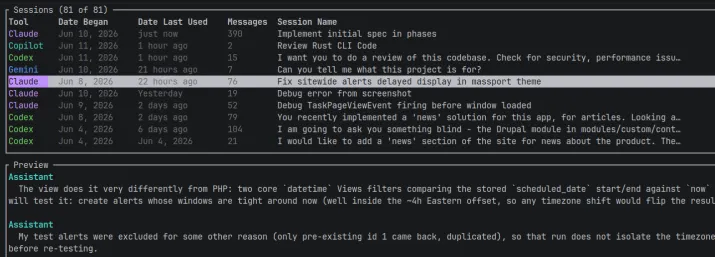
The goal is not to replace these tools. The goal is to make them easier to work with together.
Many developers have already discovered that different AI assistants often excel in different situations. It is increasingly common to move between tools depending on the task at hand. Auryn embraces that reality by providing a unified view across providers rather than forcing developers into a single ecosystem.
Key Features
Auryn focuses on practical functionality that supports real development workflows.
The application allows you to browse sessions across supported providers from a single terminal interface. Instead of opening multiple tools and searching through separate histories, you can quickly see what conversations are available and where they originated.
Session previews make it easier to identify the conversation you need before reopening it. Often a quick glance at recent messages is enough to recognize the correct session without digging through multiple candidates.
Search and filtering capabilities help narrow large conversation histories and surface relevant sessions more quickly. As developers accumulate hundreds or even thousands of conversations over time, the ability to locate important discussions becomes increasingly valuable.
Most importantly, Auryn makes it easy to resume existing work. Once you find the conversation you are looking for, you can return to the original AI tool and continue where you left off.
The application is also designed to be lightweight and local-first. It works with data already stored on your machine and does not require cloud services or external infrastructure to provide value.
Designed to Complement Your Existing Workflow
One of the guiding principles behind Auryn was restraint.
There is no shortage of tools that attempt to become the center of your development workflow. Many try to replace existing tools, introduce new layers of abstraction, or require developers to fundamentally change how they work.
Auryn takes a different approach.
It does not attempt to replace Claude Code, Codex, Gemini, or Copilot. It does not route requests between models. It does not manage credentials. It does not act as a proxy between you and your AI assistant.
Instead, it focuses on a specific problem that many developers encounter as their AI usage grows: finding and resuming previous work.
By keeping that focus narrow, Auryn remains simple, predictable, and easy to adopt.
Why Auryn Belongs in an AI Toolbox
As developers, we spend a great deal of time investing knowledge into our tools.
We build codebases, documentation systems, test suites, deployment pipelines, and knowledge bases because preserving information has value. The same principle increasingly applies to AI conversations.
The discussions we have with AI assistants often contain important context, hard-earned discoveries, and useful reasoning that should not disappear simply because a conversation has scrolled off the screen.
As AI-assisted development continues to mature, conversation history is becoming an increasingly valuable asset. The ability to find, review, and continue those conversations can save time, reduce duplicated effort, and preserve important project knowledge.
Auryn was built around that idea.
It provides a simple way to bring together conversations from multiple AI coding assistants, making them easier to browse, search, and resume without changing how you already work.
Getting Started
The immediate goal is straightforward: help developers regain access to the growing body of knowledge contained within their AI coding sessions.
If you regularly use Claude Code, Codex CLI, Gemini CLI, or GitHub Copilot CLI, Auryn can help you spend less time searching for past conversations and more time continuing meaningful work.
You can install Auryn with cargo, Homebrew or from a zip file if you are on Windows. Mac, Linux and Windows systems are all supported. For more information, you can visit the project page on GitHub here.
This is my third Rust based CLI tool I have released and quite proud of that. This is my first TUI based CLI app, however, and I think the results are great. I was able to do this entirely in Rust instead of NodeJs by utilizing the excellent Ratatui library for TUI interfaces.